
Summary
Whilst we generally recommend against uploading Zip files as they are less functional and circumvent our commercial model - instead they should be unzipped, assigned their own unique metadata and uploaded as normal - sometimes clients will want to upload Zip files. This generally happens on Arbitrations and is usually for documents that are unlikely to be referenced at the hearing and just need to be included in the bundle for reference.
We've set out the relevant wording to send to a client and how to bill the upload.
More information on general billing can be found here.
Email Template
We advise that the contents of the Zips are uploaded to their own unique references as normal to allow users to view each document separately on the platform and in turn, allow the EPE Operator to present them with ease during the Hearing.
If the zips themselves are uploaded, they can be provided to the EPE Operator however Counsel will need to direct them to the exact file within the Zip using the document title so we advise that the folders are structured in a workable format that allows both Counsel and the Operator to navigate across the files with ease.
As the documents within the zips won’t have a unique Bundle/Tab reference, the overall reference that the zip has been uploaded to will appear within the transcript and the hyperlink created will direct users to the native slipsheet containing the Zip.
Each document within the Zip file would be billable at Upload rates so please do confirm how many documents are contained within the Zip.
Billing
Approach
To avoid clients circumventing the commercial model, we i) bill for the upload/insert/replacement of the Zip itself, and ii) each document within the Zip is billed as an upload, i.e. if we upload 1 Zip containing 100 documents, it would be billed as Uploads = 101.
Working Out Billing
If the client doesn't confirm the numbers:
- Select all .zip files in a folder offline > Right Click
- Show more options > 7-Zip > Test Archive.
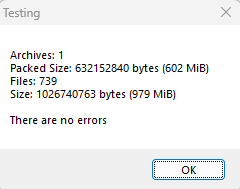
This should provide a number for how many documents are contained in all the .zip files as in the screenshot.
Note - This only works on one level, so if a .zip folder contains multiple .zip files, it will not count all the documents in those "sub-zip files" and instead will count those sub-zip files as one document so further breakdown would be required.