Summary
Minor general improvements / bug fixes in v7.20 relating to Exports, Log in & User Information and the introduction of a new feature, Pendo.
Notes
- Exports Ordering: Multiple Documents as a Single PDF from a Tag – When exporting multiple documents as a single PDF, there were sometimes issues with the order the documents came out where they did not reflect the order of the tag. This has now been improved and should reflect the tag order. This has NOT resolved any other sorting issues with exports not matching folders etc.
- Password Recovery Message – When a user goes through the password recovery process, the wording now reads as ‘Please follow the link sent to you by email from noreply@opus2.com - this may be in your junk/spam filter.’, to include the check junk/spam element to hopefully reduce the number of questions we get on this.
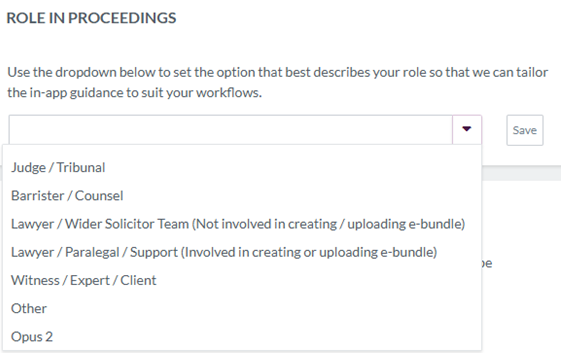
- Role in Proceedings Account Information – When users register their account, they will be forced to fill in a ‘Role in Proceedings’ field in line with the below options. We as admin can also set / change this for them from the Admin > Workspaces page. This is used for tracking the roles of users so that we can target them with in-app guides and messages via Pendo (see below).
- Pendo: Resource Centre
- General Pendo – Pendo is a third-party software that essentially overlays on our software. It allows us to put up banner message with information (such as scheduled maintenance or announcing new features), creating in-app walk through guides (i.e. highlighting buttons for users to click step by step to learn how to do things – these don’t exist yet and will be a slow roll out from the training team so more to come on this in the future) and the main one for use, include a Resource Centre. With these items we can target groups of users to show content to or hide it from, following the update at point 3.
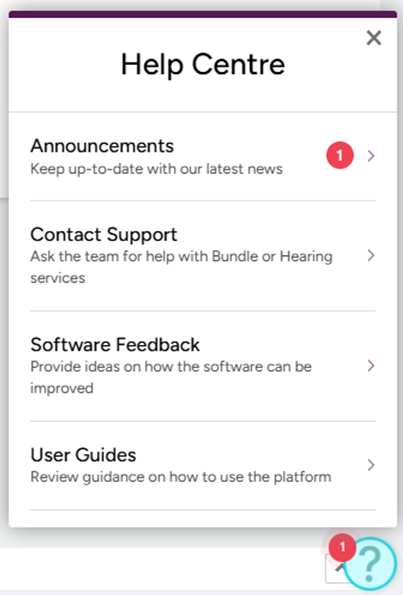
- Resource Centre – We control the Resource Centre which you will now see as the blue question mark in the bottom right (the most out the way we could get it – does not show on EPE display or Realtime) which users can click to open, and see the four modules we currently have, acting as an information hub and quick access to contact us from each page of the platform. No action needed from us apart from needing to know what it is in case clients ask so please familiarise yourselves with it.
- Announcements – Acts as a rolling blog that we can either say about downtime or make a song and dance about a new feature etc. When something new is posted, a red dot will appear on the blue question mark as a notification flag.
- Contact Support – Quick access for users to email SO or Case Managers depending on their issues. Example template of email attached, including the URL and Case Name pulled from the browser they are in.
- Software Feedback – Quick access for users to email in Software feedback, this will go directly to SOMs and Danielle.
- User Guides – Quick access links to our Freshdesk site and it has a placeholder for the Case Managers equivalent which is being worked on so the link for them doesn’t work.