
Summary
Minor general improvements / bug fixes in v7.21 relating to Exports, Copy, Export & Import Metadata Checks, Groups & Auto Bundle Tab.
Notes
For Clients:
- Include Doc. Name Value in Export Filename– Option in the Advanced… document export settings to include a suffix of the Doc. Name value in the filename, in addition to the default Bundle_Tab, i.e. ‘A_10_Witness statement of Dan Beale.pdf’.
- Implemented following consistent client feedback requiring this feature + avoids current problematic workaround.
- Slight nuance in that the filenames are shortened if longer than 160 characters or if overall file path exceeds 200 characters, to prevent issues with 256 file path character limits on computers.
- Updated Document Export FreshDesk article - https://ebundle-support.opus2.com/support/solutions/articles/43000721034-documents-exporting-
- Improvement to URL & Bundle/Tab/Page Copy Behaviour – Bug fix when copying URL & Bundle/Tab/Page values via the Document Viewer copy function following client feedback. Should now copy accurate page values in each method.
For Admin Only:
- Export CSV / Metadata Include Case Code – When exporting metadata, filename value of the Excel should be prefixed with the assigned Case Code value for the workpsace to avoid confusion over source of metadata in the file.
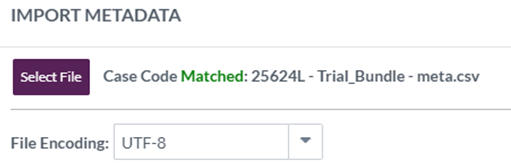
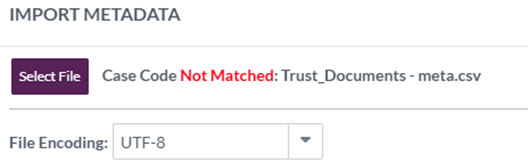
- Import Metadata Checks for Case Code– When importing metadata into the platform a check is run for the case code at the start of the filename, with a warning flag appearing to confirm the status in line with below. IT is a flag, not a preventive measure, i.e. if not matched returned, user can still import metadata without issue:
- Matched (Green) - If the case code at the start of the Filename matches the assigned case code value for the workpsace, Matched in green will appear.
- Not Matched (Red) - If the case code at the start of the Filename does not match the assigned case code value for the workspace, Not Matched in red will appear. User can still proceed to import without issue.
- Matched (Green) - If the case code at the start of the Filename matches the assigned case code value for the workpsace, Matched in green will appear.
- Admin > Groups Scroll Bar – In Admin > Groups page, independent scroll bars implemented in Workpsace Users / Notes Groups / Security Groups sections to make navigation easier.
- Auto Bundle Tab Field Bug Fix– Previously, if one field (either Bundle or Tab) was updated via CSV, it would place the updated value as the first component in the Auto_Bundle_Tab metadata value, rendering the ABT value incorrect. This has now been resolved and should work as expected and therefore can be used for tasks going forward.
- Note: the fix is for the updating of data mechanism and does not change any existing incorrect data itself. Therefore, please check the ABT values on the documents already in the bundle before using this field for bulk replace – it should in theory just be very wrong and not work if the wrong values are applied as a result of this bug, however for the sake of this potentially going wrong, just double check before using it. If you do find any that are wrong, export a CSV and import back in just the Bundle and Magnum ID fields and this should force a correct update on the ABT field.