
Summary
We have UK resources in place over a weekend (and UK bank holidays, part covered by US) to provide support for clients in the UK, MEA and APAC Regions, both Standard Weekend support to assist all matters with small tasks / queries, and Additional Resource support to assist individual matters with larger tasks which must be booked in advance.
We've outlined the scope of each support type, support timings & shift rotations, internal workflows and overtime tracking below.
More information on the weekend cover guidance we send to clients can be found here.
Scope of Support
Standard Weekend Support
Scope - Standard Weekend Support is for tasks relating to around 20 documents, any urgent queries and user access related issues. If the work required falls outside of this scope, additional resources would need to be arranged in advance (see Additional Resource Support below). We generally do not action print requests or SOM related queries (i.e. confidentiality restrictions, new workspaces etc) in standard cover. This acts a rough gauge for both us internally and for our clients to avoid them from sending large tasks at the weekend, as it is one resource supporting all matters.
Exceeding the Scope - In instances where we do receive larger requests, we can remind clients of what the standard weekend support scope is and that the task will be actioned by the team on Monday during our standard office hours. Whilst print requests are not actioned over the weekend, check any print request forms to see if this impacts any deadlines and update clients accordingly.
Emails - We should be responding to all emails over the weekend, for UK, MEA and APAC across the three matter types, ensuring that we query out-of-office on all instructions if clients have not specified whether the tasks should be actioned during our out-of-office hours. Before replying, check timesheet to ensure they don't have Additional Resources booked. Emails/phone calls that are relevant for Case Managers can be passed onto the CM (copy them into the email if they are not copied already, making sure the SO team are too) and flag it for them in the #cst_solution-operations channel on Slack.
Billing - All work to be billed at out-of-office rates. More information on out-of-office rates can be found here.
Requesting Assistance - If there are queries/emails that you are unsure on or you think they are directed at the SOM team, make sure the email is added to the board and direct a message in the #solution-operations_team_uk channel on Slack to @so-managers to ask for help. Do not just leave it.
Monitoring - As you are supporting all three matter types over the weekend, you will need to monitor all inboxes, and no filters should be applied on your Case Control. Acknowledgments, actioning and QCs should all be covered by you as the person on cover. Any reminders that appear on Case Control should also be actioned in line with the instructions on the board/email.
Phones - The person on cover is also responsible for answering any phone calls to any of the team lines so ensure your RingCentral is switched on and working.
Sitting Cases - If cases sit at the weekend, just be conscious of any messages that may be directed to us in the case channel as well as any transcripts that we may need to be process which Production would flag by Friday at the latest.
Additional Resource Support
Scope - For any large tasks which sit outside of Standard Weekend Support, clients would need to book in additional resource support by 12pm Thursday prior (flexibility on this decided by SOM on case-by-case basis) so that we can assess team availability alongside any pre-existing commitments. Additional resource is dedicated to the one matter only.
Emails / Requesting Assistance / Monitoring / Sitting Cases - As above.
Phones - Ensure RingCentral is turned on as clients on the matter may call directly to discuss any queries.
Billing - In addition to all work being billed at out-of-office rates there is a booking fee incurred for each team member in place. More information on the booking fee costs can be found here.
Support Timings & Shift Rotations
Support Timings (All times in UK) - Our weekend hours are Saturday 09:00 to 17:00 and Sunday 11:00 to 19:00. Any UK bank holidays, the hours are 09:00 to 17:00 across all of the relevant days which will also be outlined on the timesheet.
Standard Weekend Shift Rotations - Standard Weekend Support is covered by UK, taking one day per weekend on a rotation throughout the team and alternating between Saturday / Sunday (Bank Holidays included in rotation where applicable). UK Bank Holidays can be part covered by US where possible.
Additional Resource Support - Once a matter requests Additional Resource Support, a SOM will offer cover in #solution-operations_team_uk channel and will be allocated on a first come-first serve basis once claimed in the channel. Incldue the day and hours you can do.
Timesheet - Any cover (Standard & Additional) will be marked in yellow on the timesheet, with custom hours outlined if deviating from norm. Any Additional support should have the relevant case code marked.
Weekend Cover Limitations - To ensure fairness and avoid burnout, SOM will review any cover offers in line with the following:
- Nobody should be working for more than three weekends in a row in any capacity. If offering additional support will lead to working four weekends in a row this will likely be denied and offered to other team members instead.
- We will look to limit anyone from working on three consecutive weekends if they have worked both Saturday and Sunday on the previous two weekends.
Internal Workflows
Handovers - All three handovers should be sent at the end of your cover and should include any information from Friday/the previous day that is relevant to the person(s) working the next day, ensuring any comments added to the board or handover are clear.
For example, the handover sent by the person covering Saturday should include:
- Anything from the Friday handover that is relevant to the person covering Sunday and/or the team on Monday
- Anything from Saturday that is relevant to the person covering Sunday and/or the team on Monday
The Sunday handover should include the above where relevant as well as anything new they have to flag.
Tracking Overtime
Scope - You are paid both a booking rate for both Standard Weekend Support and Additional Resource Support in line with the below table, and for the number of hours actually doing client work (i.e. not including any standby time not doing work).
Booking Rate
| Type of Support | Booking Fee |
|---|---|
| Standard Weekend Support (incl. Bank Holidays) | £125 to cover the 8 hours standby |
| Half day Additional Resource Support | £125 to cover the 4 hours standby |
| Full day Additional Resource Support | £250 to cover the 8 hours standby |
Tracking Overtime in App - Two entries will need to be input in the app:
- Booking Fee - Add entry for the Date of the cover, tick On Standby, toggle Full / Half day as appropriate and press Save. Timing details should update accordingly.
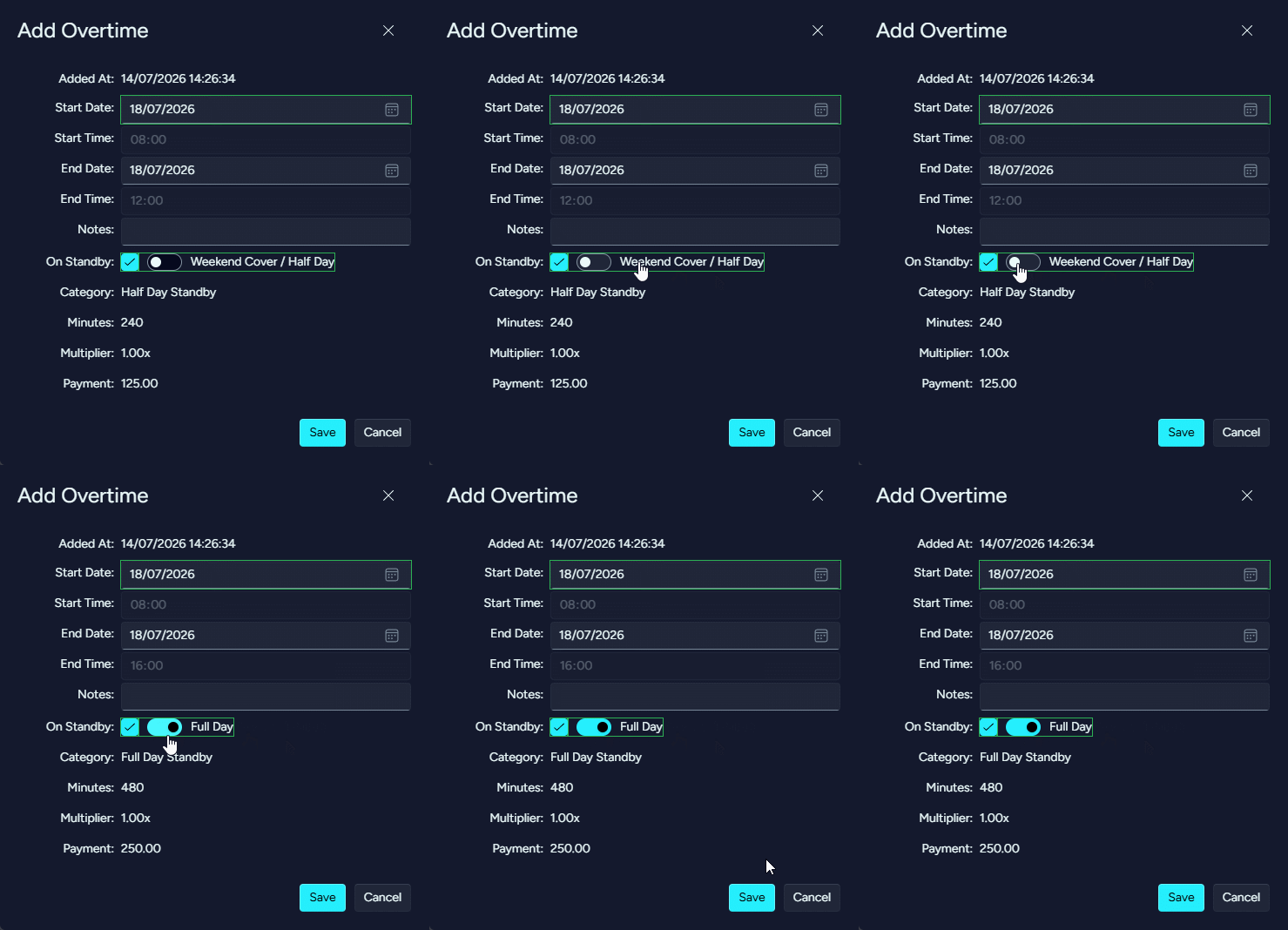
- Number of Hours Worked - Add entry for the Date of cover, input the overall time worked (combine time into one entry if worked at different parts during the day, i.e. if 10:00-11:00 and 14:00-15:00, just track 10:00-12:00) and press Save.
If two seperate entries are not included, the app will not calculate the overtime correctly. Ensure you check the entry is logged accurately to ensure correct payment.