Summary
To escalate a software issue to Product Support, we need to send a ticket in line with the Escalation Policy, and to ensure they can efficiently assist it should be sent using a specific template. The template is designed so it can be ingested into their management system, FreshDesk, and to ensure all relevant information is included.
We've set out below the ticket template files for general issues and user access requests, alongside populated table examples for review.
More information on the:
- Escalation Policy can be found here.
- Incorrect Document Release Process can be found here.
General Ticket Template
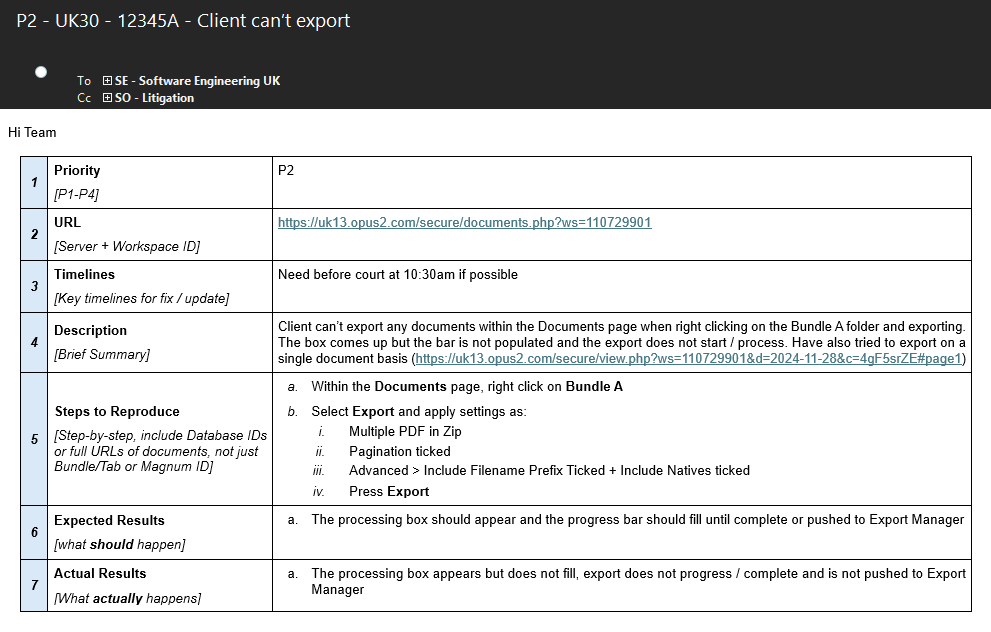
The following ticket template should be used for all tickets except for user access requests and populated in line with the Escalation Policy.
Ensure it is populated in full (including subject line + CC relevant team email), with enough information for Product Support to be able to replicate the issue and ensure a SOM signs off on the ticket before sending.
Select the Mail icon to download the general ticket template. 
Populated General Ticket Example
User Access Ticket Template
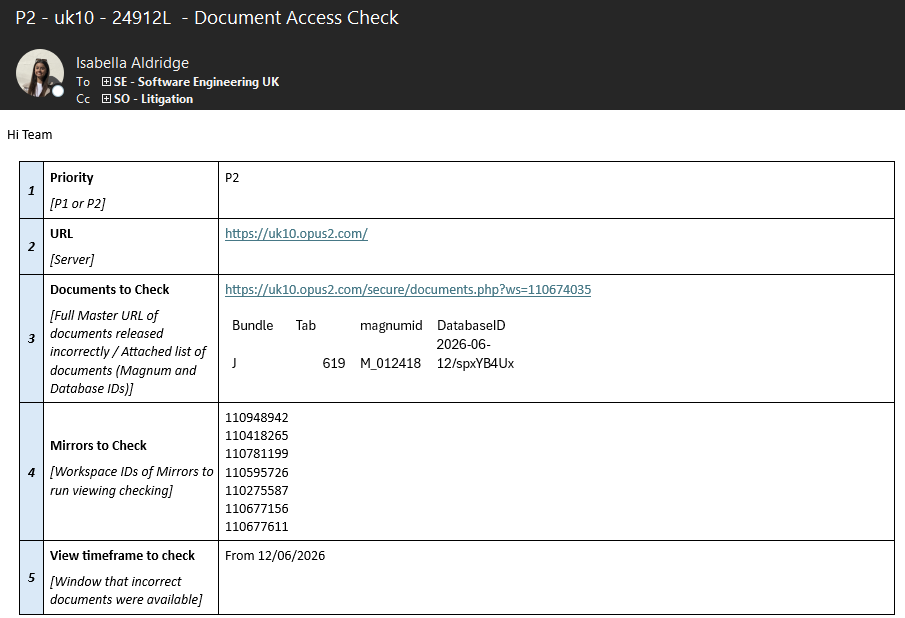
In the event we need to check if a user accessed a workspace / documents, the following ticket template should be used for user access requests only, whilst still being populated in line with the Escalation Policy.
Ensure it is populated in full (including subject line + CC relevant team email), with enough information for Product Support to be able to investigate and ensure a SOM signs off on the ticket before sending.
Select the Mail icon to download the user access ticket template. Scope of Checks
- What we CAN check:
- Document Being Viewed - Both in the preview window (covering search preview too) and the document viewer.
- Log In - When the user was logged in. In case this rules out access possibility following uploads at a certain time.
- What we CANNOT check for certain:
- Export - No way to accurately tell if a user exported a document.
- Everything Else - Half audit, can say if user X visited a page but not what they then did.
- I.e. User accessed the Notes page but cant say which notes they did or did not look at, or they did access Realtime but not which parts of the transcript they looked at.
- Report
- Need Database ID from Master workspace only, and ask for relevant workspaces to be checked giving relevant Workspace IDs!
- Deleting Documents
- If ACL Report / check is needed, do not delete the documents as it makes it harder to find the data, sync/hide instead.
- Need Database ID from Master only as a minimum and then may be able to find the historic data in the logs if fully deleted.
Populated User Access Ticket Example